Transfer Assertions
Overview
Section titled “Overview”Some rows in an exchange or wallet export can’t be classified by data alone. A deposit of 0.75 ETH might be a purchase you made elsewhere, an airdrop — or simply your own coins coming back from a wallet you controlled the whole time. The file doesn’t say. And the difference matters: one of these creates taxable income or a new cost basis, and one changes nothing at all.
PrivateACB’s rule is that it never guesses on questions like this. It detects the ambiguity, blocks the calculation when the year you’re calculating is actually at stake, shows you the evidence — and asks. Transfer assertions are how you answer, from version 2.11.0 onward.
An assertion is a recorded decision about your own data:
- It never modifies your imported rows. Your data stays byte-for-byte what the exchange exported. Assertions are stored alongside it and applied only when calculations read the data.
- It is recorded as your decision. Every assertion is stamped as user-asserted, with a timestamp, and noted in the System Messages log.
- It is fully reversible. Undo all removes every recorded decision for an asset and restores the exact pre-assertion state — because the underlying data was never touched.
Where you’ll see assertion actions: the Preflight Report
Section titled “Where you’ll see assertion actions: the Preflight Report”From 2.11.0, every asset row in the ACB Calculator can unfold into a Preflight Report — click the row’s chevron (▶) or its Preflight Check label (the label tells you what the row needs — Needs transfer, Needs attention, Fetch prices, or Review). The report shows five checks, good news included:
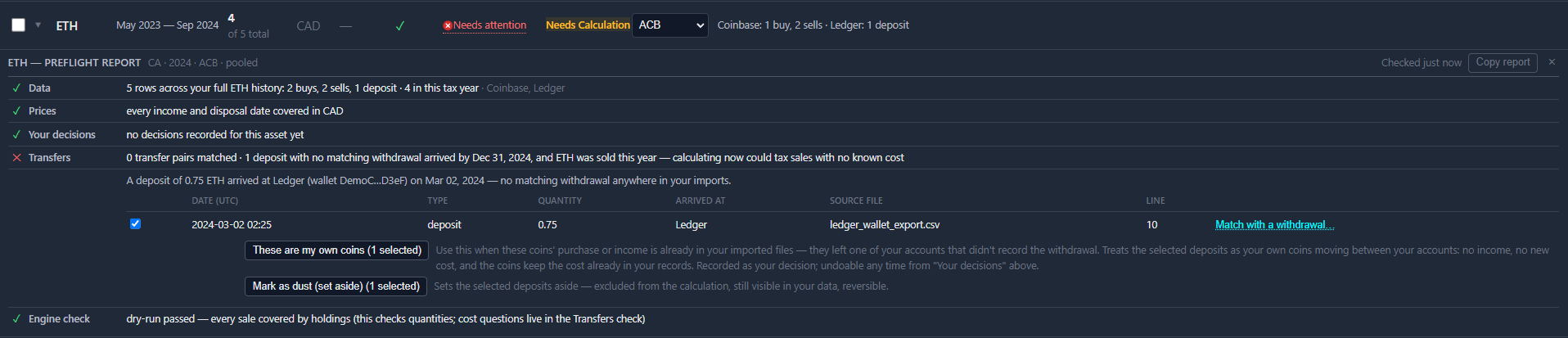
| Check | What it tells you |
|---|---|
| Data | How many rows loaded across your full history, broken down by type, and how many fall in the selected tax year |
| Prices | Whether every income and disposal date has a price in your reporting currency |
| Your decisions | Every assertion you’ve recorded for this asset — with dates, and the way to undo them |
| Transfers | Transfer pairs matched, and any deposits with no matching withdrawal in your imports |
| Engine check | Whether a dry-run calculation completed — every sale covered by holdings |
One thing the Transfers check is careful about is timing. A deposit can only affect tax years that end after it arrived. So a 2024 deposit with no matching withdrawal blocks a 2024 calculation — but if you’re calculating 2022, the report simply notes that the deposits arrived after Dec 31, 2022 and cannot affect that year, and lets you calculate. Deposits that postdate the year you’re working on are tagged individually as (after this tax year) and left out of the blocking count. You are never blocked by events that happened after the year you’re calculating.
Assertion actions live on the Transfers check. When a deposit has no matching withdrawal, the check shows an evidence table — the actual rows, with date (UTC), type, quantity, where they arrived, the source file, and the exact line in that file — grouped by the account or wallet the coins arrived at.
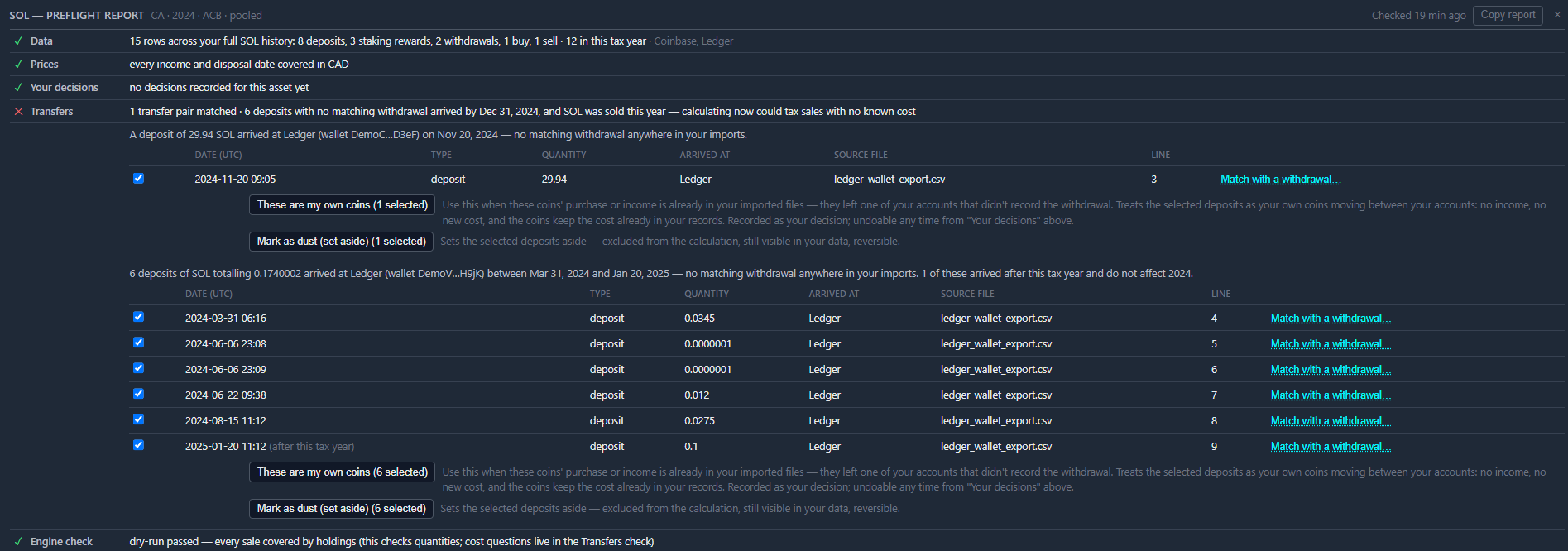
There are two kinds of control, and the difference matters:
- Group buttons, below each group — These are my own coins and Mark as dust (set aside). Every row in the group starts ticked; untick any that don’t belong, and the button applies to the rest, showing the live count as it goes (“These are my own coins (5 selected)”).
- A per-row link — Match with a withdrawal…, at the right of each evidence row. This one is about a single deposit, so it lives on that deposit’s row rather than on the group.
Every committing action shows a confirmation dialog stating exactly what will be recorded before anything happens.
| Action | Where | Use it when |
|---|---|---|
| These are my own coins | Group button | The received coins were yours all along — their purchase or income is already in your imported files; only the sending side of the move is missing |
| Mark as dust (set aside) | Group button | The row is blockchain noise — a microscopic on-chain artifact or an unsolicited token you never wanted |
| Match with a withdrawal… | Row link | Both legs of the transfer ARE in your imports, but the app couldn’t pair them automatically (for example, a long gap between sending and receiving) |
The report header also has a Copy report button — the full report, all checks and evidence, as plain text for your notes or your accountant.
The three assertions
Section titled “The three assertions”What each one records, changes, and never touches is set out channel by channel in the Resolution Guide — generated from the app itself, so it always describes the version you’re running. This page covers what the three look like in use.
These are my own coins
Section titled “These are my own coins”The buttons sit under each group of deposits — one group per account or wallet, so one group usually tells one story. All rows start ticked; untick any that don’t belong (say, a dust row in a group of real transfers) and the button shows how many are selected. The confirmation dialog states the count before anything is recorded.
Typical cases:
- Staking platforms with hidden sub-accounts. Some exchanges run your staked balance as a separate internal account and export only one side of each movement. Coins entering or leaving the staking program can show up as deposits with no matching withdrawal.
- Transfers from an account you didn’t import. You moved coins from your own wallet or another exchange, and that source’s history isn’t part of your imports.
Note what this one does not do: it records your decision, it doesn’t supply a cost. If the coins’ purchase or income is nowhere in your imports, the calculation still holds no cost for them. The walkthrough covers that case and what closes it.
Mark as dust (set aside)
Section titled “Mark as dust (set aside)”Sets the selected rows aside — excluded from calculations entirely, the same way underscore-labelled unknown rows from wallet exports are excluded. Use it for sub-cent on-chain artifacts and unsolicited spam tokens. The rows remain visible in your data; they simply stop participating in tax math.
Match with a withdrawal…
Section titled “Match with a withdrawal…”Each deposit in the evidence table has a Match with a withdrawal… link. It lists the withdrawal rows in your imports that could plausibly be its other leg: same asset, dated before the receive, quantity within 2% (network fees). There is deliberately no time limit — coins parked in cold storage for years still match.
Selecting a candidate shows the two rows side by side — withdrawal and deposit, each with quantity, account, and date — and explains the difference between them (for example: “The deposit is 0.06 SOL (0.2000%) smaller than the withdrawal — consistent with a network fee.”). Confirming records that the two rows are one transfer of your own coins. The pair is then treated exactly like any automatically matched transfer: no tax impact, and under US per-wallet tracking the tax lots move between accounts correctly.
PrivateACB’s automatic matcher pairs legs that occur within 48 hours of each other. The classic case this action exists for: you withdrew coins to your own hardware wallet, held them for days, months, or years, then sent them back. Both rows are in your file — only the clock kept them apart.
Your decisions — the permanent record and the undo
Section titled “Your decisions — the permanent record and the undo”The Your decisions check is always in the report, even when everything is green. Once you’ve recorded anything, it lists each decision — what you decided, the quantity, the details (for a matched pair: both legs and their dates), and the date you recorded it.
Next to the list is Undo all…. It removes every recorded decision for that asset — pairs and classifications — and the report re-checks immediately. Because your imported rows were never modified, this is a perfect restore: the next preflight run sees exactly what it saw before you asserted anything.
Assertions also automatically invalidate the affected asset’s cached preflight verdict and mark prior calculations as stale, so you’ll never see results computed from a pre-assertion state presented as current.
What PrivateACB recognizes without asking
Section titled “What PrivateACB recognizes without asking”Assertions exist for the questions only you can answer. Where the exported data itself is unambiguous, 2.11.0 classifies it automatically and no issue is raised:
- Explicit staking-movement labels. Rows an exchange explicitly labels as movements into or out of its staking program (for example, NDAX’s
STAKING / DEPOSITandSTAKING / REFUND) are recognized as internal movements — not deposits of new coins, and not income. Your actual staking rewards are unaffected and are still counted as income exactly once. - Explicitly unknown wallet rows. Rows a wallet-history exporter marks as unknown (Stake.tax’s
_UNKNOWNlabel) are set aside rather than surfacing as deposits with no matching withdrawal — this also keeps unsolicited spam-token airdrops out of your holdings.
If you disagree with an automatic classification, the standard tools still apply: reclassify during import (Step 3 of the wizard) or exclude the asset in the Data Viewer.
How assertions appear in your records
Section titled “How assertions appear in your records”- The Your decisions check in the Preflight Report is the living record — every decision, dated, with its undo one click away.
- Every assertion and every undo is also logged in System Messages with the asset, the record count, and the action — a plain-text audit trail you (or your accountant) can export. Copy report captures the whole preflight picture, decisions included.
- Calculation results computed after an assertion reflect it immediately; results computed before show as Needs Calculation until you recalculate.
- Assertions live in your local database file, like everything else in PrivateACB. Nothing leaves your machine.
Does asserting change my CSV files or imported rows? No. Never. Assertions are stored in separate tables and consulted at calculation time. Your imported data remains exactly as the exchange exported it.
What if I asserted something by mistake? Open the asset’s Preflight Report, find the Your decisions check, and click Undo all…, then recalculate. The restore is exact.
Why doesn’t PrivateACB just decide these cases automatically? Because the data genuinely doesn’t say, and the difference is tax-consequential. A deposit with no visible source could be your own coins (no tax event) or unreported income (a tax event). PrivateACB’s design rule is: detection is the app’s job, the evidence is shown to you, and the decision — recorded and reversible — is yours.
Can I create a cost basis or type in a price with an assertion? No. Assertions deliberately cannot create values — they only record relationships (“these two rows are one transfer”) or classifications (“own coins”, “dust”). If units genuinely need a cost basis established, use the resolution paths in Preflight Errors.
Is this the same as Create Transfer? No. Create Transfer (US Account-by-Account only) creates a new synthetic send + receive pair to move tax lots between accounts — see the Account-by-Account Tracking Guide. Assertions never create rows; they record decisions about rows you already imported. A deposit with no matching withdrawal is resolved with assertions, not Create Transfer.
Do assertions sync between databases? No. They’re part of the database file they were made in, like all your data. If you rebuild a database from fresh imports, you’ll be asked again.
Related Guides
Section titled “Related Guides”- Preflight Errors — Every preflight check and how to clear it
- Transaction Types — How PrivateACB classifies deposits, withdrawals, and transfers
- Classification Review Guide — Step 3 of the import wizard
- US 1099-DA & Account-by-Account — Create Transfer and per-wallet lot movement
- Data Viewer — Inspecting the rows behind a finding
Last Updated: July 2026 PrivateACB Version: 2.12.0