
Example reports
Four fictitious portfolios, one per country, built from real exchange export layouts. Everything on this page is what PrivateACB produced from those files with the settings shown. Nothing is edited by hand, and nothing here is tax advice.
The sections below show what the program's reports look like for each country. Under Choose a report, pick a country, then one of the calculation runs made earlier in the program, then a report type and an asset. The combination you choose appears in the Report viewer as the first page of the PDF, with buttons to open the whole PDF and to download the CSV the program produced with it, for a closer look. If you want to test the program against these files, the Test it yourself section further down has the input files for each country as one download, with the settings and the steps to repeat the run. Your reports should match these to the cent. If they don't, that's a bug, and I want to hear about it.
The PDF is the full report in a new tab. The CSV repeats the PDF's figures for your records; it is not an input file. The input files are under Test it yourself.
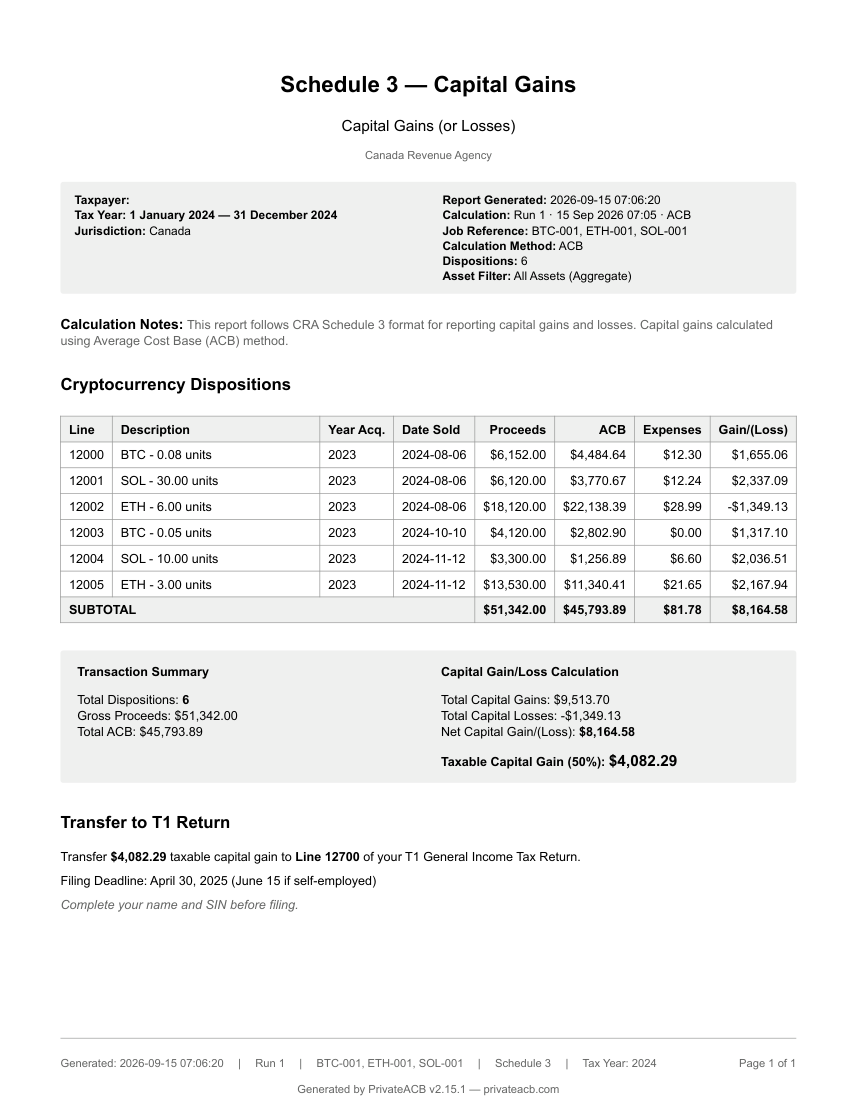
A website viewer, not the program: it shows page one of each report the program produced. The full report is in the PDF.
Test it yourself
Reports exported 2026-09-15 from PrivateACB 2.20.0. The same files run as a test inside the program's own test suite on every build, so a change to any figure here fails the build.
The input files
A Canadian who buys bitcoin on Shakepay and NDAX, holds ether on Kraken, stakes solana on NDAX, moves a quarter-bitcoin from Shakepay to Kraken, sends a little to a hardware wallet, and sells some of each in 2024. Ether is sold at a loss in August and partly re-bought twelve days later.
| File | Rows | From |
|---|---|---|
| shakepay_transactions.csv | 12 rows | Shakepay → Transaction history export (the real 11-column layout) |
| ndax_trades.csv | 8 rows | NDAX → Trade history export |
| ndax_staking.csv | 10 rows | NDAX → Staking export (rewards, plus the program's own deposit and refund) |
| kraken_ledgers.csv | 23 rows | Kraken → Export → Ledgers (the current 12-column layout) |
| kraken_trades.csv | 6 rows | Kraken → Export → Trades (the current 16-column layout) |
| prices_SOL.csv | 8 rows | you would fetch these in the app; the files make the walkthrough repeatable offline |
| prices_ETH.csv | 6 rows | you would fetch these in the app; the files make the walkthrough repeatable offline |
Repeat it yourself — about 10 minutes
Jurisdiction: Canada · Tax year: 2024 · Method: ACB (the only one) · Assets calculated: BTC, ETH, SOL
- File → New Database. Use a fresh database for the set, not one that holds your own data.
- File → Import, one file at a time: shakepay_transactions.csv · ndax_trades.csv · ndax_staking.csv · kraken_ledgers.csv. The Import window names each exchange from its header; when the Kraken ledger is open it offers to attach the Trades file — choose kraken_trades.csv.
- Market Data tab: on the SOL row choose Upload CSV → prices_SOL.csv, and on the ETH row prices_ETH.csv. Use the upload, not Fetch: only the two price files reproduce the published figures to the cent.
- ACB Calculator: Canada, 2024, ACB. Expand each asset's Preflight Report and answer the one question (below). Calculate.
- Reports: the Report Selector lists the run; export ACB Summary · Schedule 3 · Superficial Loss · Income · T1135 · Audit Provenance.
- Settings → Foreign Property Status: Shakepay In Canada · NDAX In Canada · Kraken Outside Canada. Open the T1135 again — the program does not guess where an account is.
The input files
An American who buys bitcoin, ether and solana on Kraken in 2024, moves a fifth of the bitcoin and most of the solana to a hardware wallet in January 2025, stakes the solana there, and sells some of each during 2025 — some from Kraken, some from the wallet. Ether is sold at a loss in April and re-bought eighteen days later.
| File | Rows | From |
|---|---|---|
| kraken_ledgers.csv | 30 rows | Kraken → Export → Ledgers (the current 12-column layout) |
| kraken_trades.csv | 11 rows | Kraken → Export → Trades (the current 16-column layout) |
| wallet_transactions.csv | 13 rows | a wallet has no standard export; this is PrivateACB's own Generic layout, the shape any wallet history can be put into |
| prices_SOL.csv | 9 rows | you would fetch these in the app; the file makes the walkthrough repeatable offline |
Repeat it yourself — about 15 minutes
Jurisdiction: United States · Tax year: 2025 · Account-by-Account: on (T.D. 10000) · Safe-harbor allocation: none entered · Three runs: FIFO · HIFO · FIFO with the wash-sale toggle on
- File → New Database. Use a fresh database for the set.
- File → Import kraken_ledgers.csv; when the window offers the Trades file, choose kraken_trades.csv. Then import wallet_transactions.csv — the window shows the Generic layout.
- Market Data tab: on the SOL row choose Upload CSV → prices_SOL.csv.
- ACB Calculator: United States, 2025, FIFO, Account-by-Account on, wash sale off. Expand each asset's Preflight Report; SOL is blocked on purpose — answer the one question (below). Calculate: that is run 1.
- Reports: export Form 8949 · Schedule D · Lot Tracking · Income · Audit Provenance.
- Set the method to HIFO and Calculate again: run 2. Export Form 8949 · Schedule D · Lot Tracking. Pick run 1 in the Report Selector and its reports are back exactly as they were.
- Set the method back to FIFO, turn the wash-sale toggle on, and Calculate: run 3. Export Form 8949 · Schedule D · Wash Sale. Compare run 1 with run 2 for the method difference, and run 1 with run 3 for the April ether loss deferred.
The input files
An Australian buys bitcoin and solana on Kraken in 2023 and more bitcoin in 2024, moves the solana and some of the bitcoin to a hardware wallet, stakes the solana there, and during FY2024 sells bitcoin from both places, some solana from the wallet, and ether bought in December 2024 — one sale on 30 June 2025 and one on 1 July.
| File | Rows | From |
|---|---|---|
| kraken_ledgers.csv | 23 rows | Kraken → Export → Ledgers (the current 12-column layout) |
| kraken_trades.csv | 8 rows | Kraken → Export → Trades (the current 16-column layout) |
| wallet_transactions.csv | 10 rows | a wallet has no standard export; this is PrivateACB's own Generic layout |
| prices_SOL.csv | 5 rows | you would fetch these in the app; the file makes the walkthrough repeatable offline |
Repeat it yourself — about 10 minutes
Jurisdiction: Australia · Tax year: 2024-25 (1 July 2024 – 30 June 2025) · Method: FIFO (the default) · Assets calculated: BTC, ETH, SOL
- File → New Database. Use a fresh database for the set.
- File → Import kraken_ledgers.csv; when the window offers the Trades file, choose kraken_trades.csv. Then import wallet_transactions.csv — the Generic layout.
- Market Data tab: on the SOL row choose Upload CSV → prices_SOL.csv.
- Settings: Australia, tax year 2024-25. The Review tab shows nothing blocking and no decision to record — both transfers to the wallet arrive the same day they left.
- ACB Calculator: calculate BTC, ETH and SOL. Reports: export CGT Summary · CGT Worksheet · Lot Tracking · Income · Audit Provenance.
- Switch the year to 2025-26: the ether sold on 1 July 2025 appears on its own — the first day of the next tax year.
The input files
Someone in the UK buys bitcoin, ether and solana on Kraken in 2023, moves the solana to a hardware wallet and stakes it there, buys more bitcoin in 2024 and moves some of it to the wallet the same afternoon, and during 2024/25 sells some of each — bitcoin from both Kraken and the wallet. Ether is traded to show the UK's two matching rules: bought and sold on the same day, then sold and bought back twelve days later.
| File | Rows | From |
|---|---|---|
| kraken_ledgers.csv | 31 rows | Kraken → Export → Ledgers (the current 12-column layout) |
| kraken_trades.csv | 12 rows | Kraken → Export → Trades (the current 16-column layout) |
| wallet_transactions.csv | 10 rows | a wallet has no standard export; this is PrivateACB's own Generic layout |
| prices_SOL.csv | 6 rows | you would fetch these in the app; the file makes the walkthrough repeatable offline |
Repeat it yourself — about 10 minutes
Jurisdiction: United Kingdom · Tax year: 2024/25 (6 April 2024 – 5 April 2025) · Method: nothing to choose — the Section 104 pool with the same-day and 30-day rules · Assets calculated: BTC, ETH, SOL
- File → New Database. Use a fresh database for the set.
- File → Import kraken_ledgers.csv; when the window offers the Trades file, choose kraken_trades.csv. Then import wallet_transactions.csv — the Generic layout.
- Market Data tab: on the SOL row choose Upload CSV → prices_SOL.csv.
- Settings: United Kingdom, tax year 2024/25. The Review tab shows nothing blocking and no decision to record.
- ACB Calculator: calculate BTC, ETH and SOL. Reports: export SA108 · Capital Gains Details · Pool History · Income · Audit Provenance.
- Switch the year to 2025/26: the ether sold on 6 April 2025 appears on its own — the first day of the next tax year.