
Private Terminal
A free desktop research dashboard. Macroeconomics, your watchlist, and one screen that shows where everything stands today against the last five years. Built the same way as PrivateACB: on your computer, no account.
FreeNo accountWindows 10 and 11Open source, MIT1.1.0
Download for Windows View the source on GitHub ↗
Why I built it
Most retail charting tools gate their features behind an account, sell what they learn about you, or push you towards a paid tier. I build privacy-first software for a living and I follow markets, so I wanted a research dashboard that worked the way my own tools work. I built one and gave it away. It answers the same question PrivateACB does, the same way: your data is yours.
What is inside
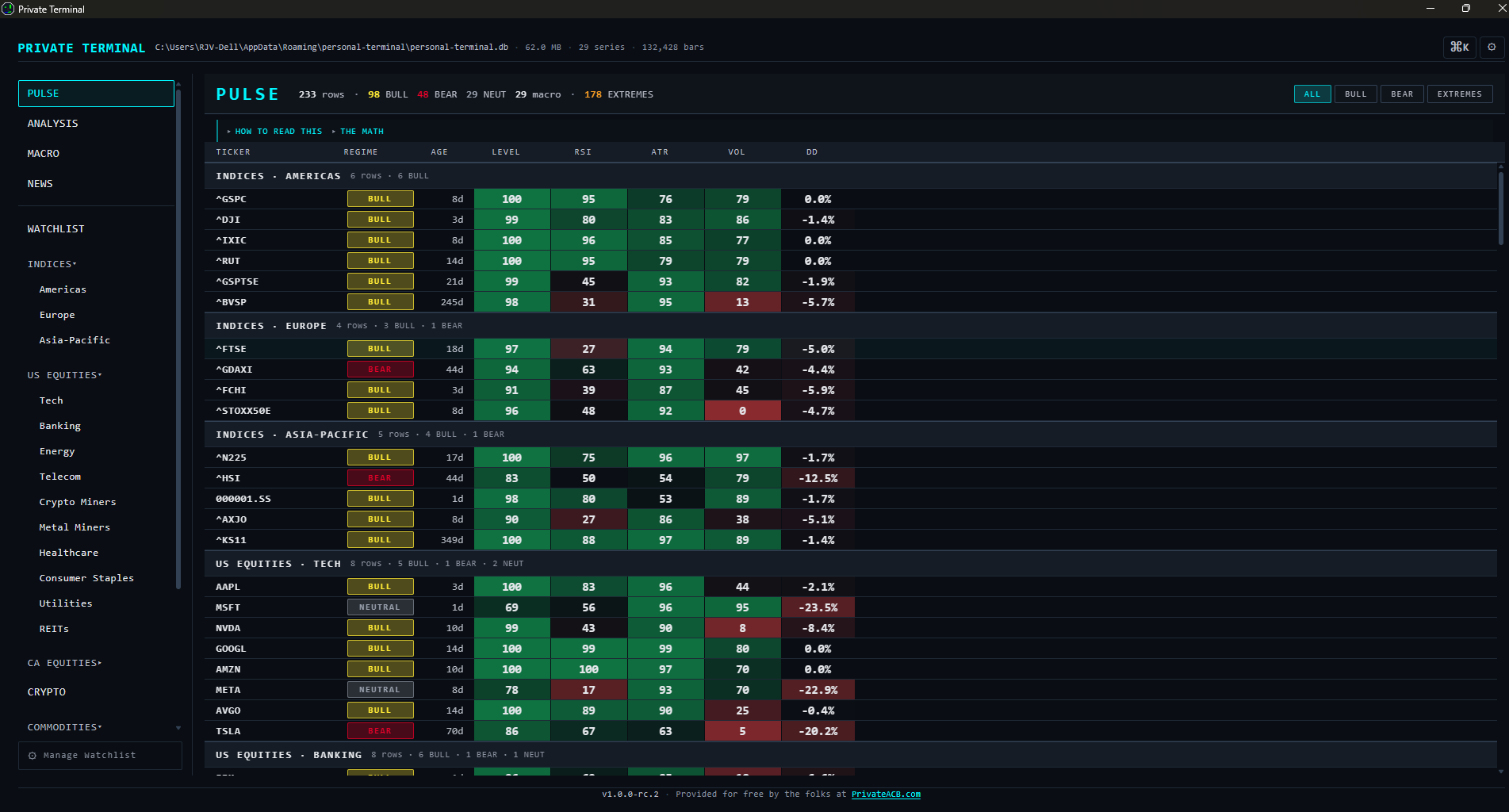
- Pulse
- Every watchlist ticker plus every macro series as a percentile rank against a five-year baseline. The "what is unusual this morning" screen.
- Macro dashboard
- 29 economic series from FRED across rates, inflation, labour, growth, housing, liquidity, risk and energy, with a year-over-year heatmap view.
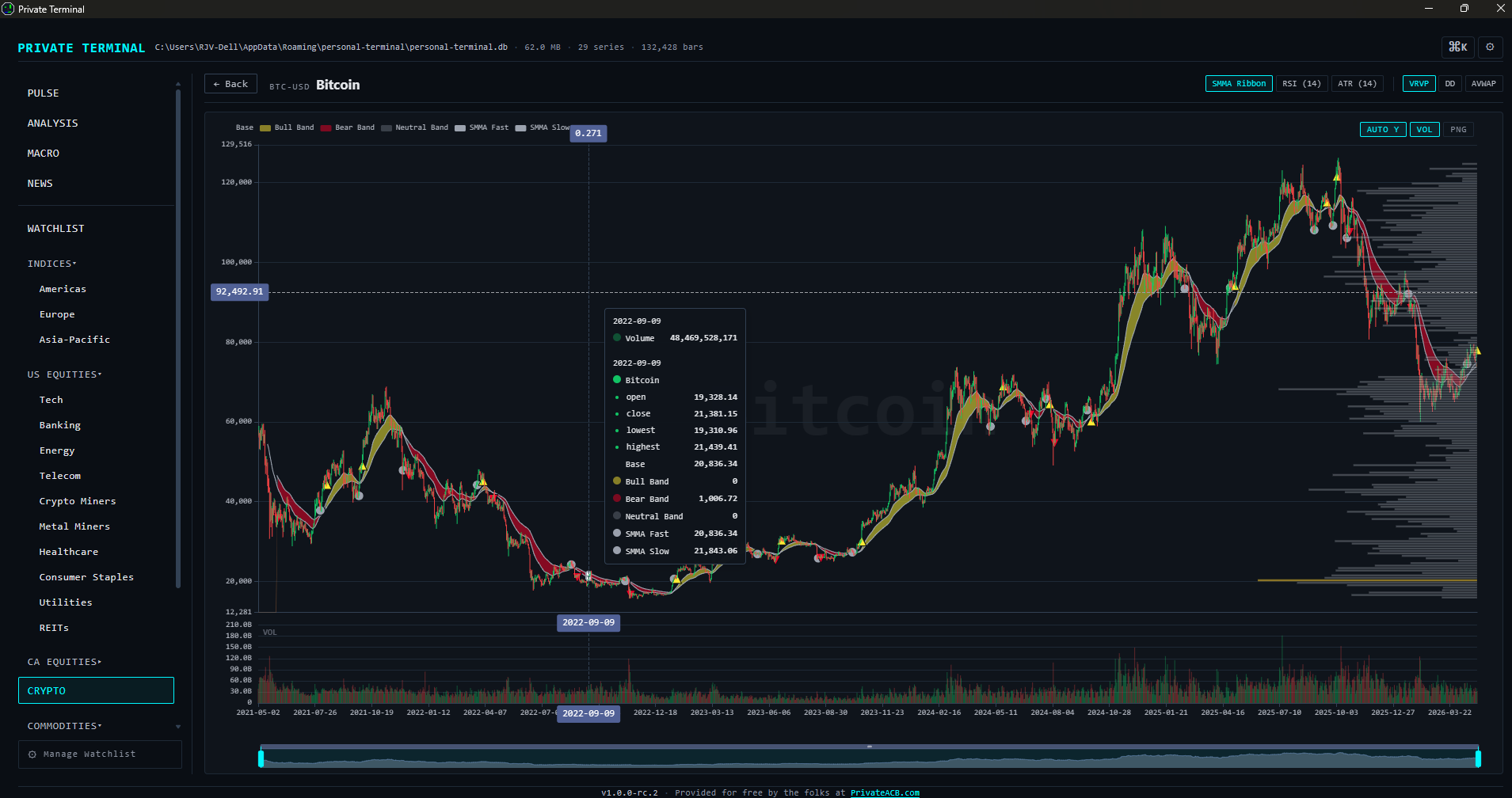
- Charts
- Candlestick charts with the indicators that are subscription-tier elsewhere: SMMA ribbon, RSI, ATR, volume profile, drawdown, and anchored VWAP you place by clicking on the price pane, up to five anchors per ticker.
- Analysis
- Eight cross-asset tools: correlations, pairs ratios, a relative rotation graph, the yield curve, recession probability, financial conditions, a macro regime quadrant and a backtest of the SMMA ribbon, each with plain-language guidance on reading it.
- Watchlist
- 176 seed tickers across US and Canadian equities, the largest cryptocurrencies, world indices, commodities, currencies, bond ETFs and the VIX. Add your own; restructure freely.
- Command palette
- Ctrl+K searches tickers, sectors, FRED series and the analysis tools. Two keystrokes to anywhere.
Built the same way as PrivateACB
- No account, ever.
- No telemetry, no analytics, no crash reporter, no update check.
- Everything in one SQLite file on your computer. Delete the file and the data is gone; there is no remote copy.
- No upsells inside the program.
- The full source on GitHub, under the MIT license.
The program lists its own outbound connections under Settings, on its Privacy tab. This is that list. Each is a request to a public data source for the data that source publishes, nothing more.
| Destination | What for | When |
|---|---|---|
| FRED (api.stlouisfed.org) | Macroeconomic series and their upcoming release dates from the St. Louis Fed | When the Macro screen opens, at most every 12 hours, or when you press Refresh |
| Yahoo Finance (query1.finance.yahoo.com) | Quotes and price history for the tickers on your watchlist | When you open a section, at most every 15 minutes, or when you press Refresh; price history when a chart opens |
| Finnhub (finnhub.io) | US-equity news headlines, only if you supply a Finnhub key | Every fifteen minutes while News is open |
| News RSS publishers | Headline feeds each publisher already broadcasts (BBC, CNBC, the Fed, the Bank of Canada, FP, CBC, Al Jazeera) | Every thirty minutes per feed while News is open |
| Your browser | Opens a headline or the PrivateACB link in your default browser, the same as typing it | Only when you click one |
API keys you enter for FRED or Finnhub are kept in that same SQLite file, not encrypted, and leave the machine only as part of the request to that service. Removing a key in Settings removes it from the file. PrivateACB's own stance is on Why PrivateACB; the privacy policy has a section on Private Terminal.
Get it
Windows 10 and 11. The installer is about 5.5 MB, with a file of SHA-256 sums on the same release page to check it against. No account needed. Version 1.1.0, September 2026.
Download the installer View the source on GitHub ↗
- First launch shows a Windows SmartScreen warning. Private Terminal is not code-signed, by choice: it is open source, and every release can be checked against its source instead. Choose More info, then Run anyway. The source is open if you would rather build it yourself.
- The Macro dashboard needs a free FRED key (a few minutes at fred.stlouisfed.org ↗). The rest of the program works without one.
- Windows only for now. Tauri can build for Mac and Linux and the code is portable; I have not packaged for them. Pull requests are welcome.